Use Rational Rose to Identify Undocumented DOM Properties & Methods
LotusUserGroup.org recently mentioned NotesUIDocument.modifiedSinceSaved [1] interesting property for us to use from Release 6. This post describes how you can use Rational Rose to identify other undocumented LotusScript DOM unsupported features.
From Rational Rose Tools - COM - Import Type Library... select notes32.tlb type library
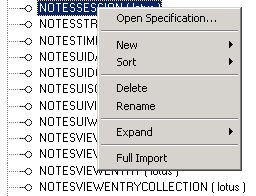 Once all Domino Object Model (DOM) classes have been imported, use the left-pane class browser, right-click NotesSession class and select Full Import. Such expands all NotesSession class attributes and operations. Note .InternetDomainName, .InternetHostname newly exhibited properties.
You can expand all DOM classes at once scrolling down to the Component View branch. Right click «COM» lotus component and run the Full Import action.
You should now be able to benefit, with caution goes without saying, from undocumented DOM features.
[1] LotusUserGroup.org Developer Tips Newsletter - October 2006
From Rational Rose Tools - COM - Import Type Library... select notes32.tlb type library
 Once all Domino Object Model (DOM) classes have been imported, use the left-pane class browser, right-click NotesSession class and select Full Import. Such expands all NotesSession class attributes and operations. Note .InternetDomainName, .InternetHostname newly exhibited properties.
You can expand all DOM classes at once scrolling down to the Component View branch. Right click «COM» lotus component and run the Full Import action.
You should now be able to benefit, with caution goes without saying, from undocumented DOM features.
[1] LotusUserGroup.org Developer Tips Newsletter - October 2006
Labels: Rational Rose, SnTT
posted by Alain H Romedenne at
7:20 AM


